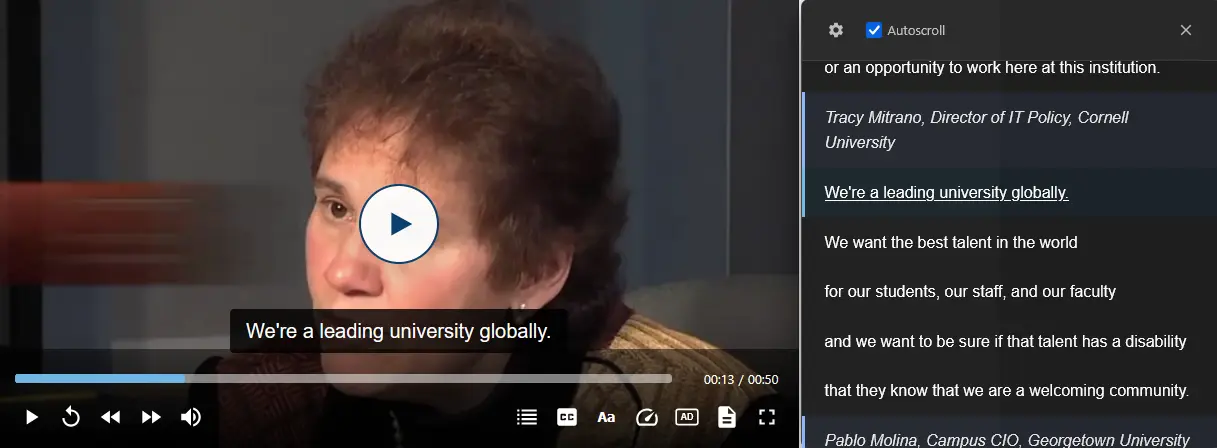
VidPly is a modern, feature-rich media player developed using vanilla ES6 JavaScript. It offers WCAG 2.2 AA compliance and support for five languages. It features built-in light and dark modes, as well as many other features.
Important highlights
- No dependencies – Pure vanilla JavaScript, no frameworks required
- Accessibility first – WCAG 2.2 AA compliant with full support for keyboard and screen readers
- Multilingual – Built-in translations for 5 languages with easy extensibility
- Light and dark mode – switch between light and dark themes
- Fully customisable – CSS variables and comprehensive JavaScript API
- Modern structure – ES6 modules with tree-shaking support
- Tested – Thoroughly tested with real media content
View live demos | GitHub repository
System requirements
- Node.js 18+ for building (Node 24 recommended)
- Modern browsers: Chrome 90+, Firefox 88+, Safari 14+, Edge 90+
- iOS Safari 14+ and Android Chrome 90+
Support for core media
| Function | Support |
|---|---|
| Video | MP4, WebM, OGG |
| Audio | MP3, OGG, WAV |
| YouTube | Embedded with standardised controls |
| Vimeo | Embedded with standardised controls |
| HLS | Adaptive bitrate streaming with quality selection |
| Playlists | Audio, video and mixed media with thumbnails |
| Preview thumbnails | Preview images when hovering over the progress bar |
| Languages | EN, ES, FR, DE, JA + custom |
Accessibility features (WCAG 2.2 AA)
Keyboard navigation
- All functions are accessible via the keyboard
- Custom keyboard shortcuts for common actions
- Menu navigation using arrow keys
- Logical focus order with visible indicators
Support for screen readers
- Full ARIA labels (aria-controls, aria-expanded, aria-haspopup)
- Live areas for dynamic announcements
- Semantic HTML structure
Interactive transcripts
- Click on any line to jump to that point
- Searchable text content
- Automatic scrolling during playback
- Draggable and resizable window
Sign language overlay
- Picture-in-picture display
- Drag and resize function
- Keyboard-accessible positioning
- Support for multiple sign languages
Audio description
- Alternative audio track with descriptions of visual content
- Switch between standard and described versions
Additional accessibility
- Customisation of subtitle style (font, size, colour, opacity, border style)
- Support for high-contrast mode (Windows HCM)
- Colour-blind design
- Touch targets of at least 44 × 44 pixels for mobile devices
Subtitles and captions
- WebVTT support – standard format for subtitles
- Multiple languages – support for multiple audio tracks with easy switching
- Subtitle selection – Easy switching between tracks using the CC button
- Subtitle styling – Dedicated styling menu
- Chapter navigation – Jump to chapters in the video
Playback features
- Adjustable speed – 0.25x to 2x playback speed
- Search control – Forward and reverse navigation
- Volume control – 0–100% with mute
- Loop playback – Single loop or playlist loop
- Full-screen mode – Native full-screen API with smart playlist overlay
- Picture-in-picture – PiP support for multitasking
Playlist functionality
- Audio playlists with track information
- Video playlists with thumbnails
- Mixed media playlists – audio and video combined in a single playlist
- ‘Back’ and ‘Next’ controls
- Visual playlist window
- Automatic skip to next track
- Full-screen mode – YouTube-style horizontal carousel with automatic fade-in/fade-out
- Swipeable touch interface
- Responsive card layout
Audio playlist demo | Video playlist demo | Mixed media demo
Internationalisation
Built-in support for 5 languages:
- English (en)
- Spanish (es) – Español
- French (fr) – Français
- German (de) – Deutsch
- Japanese (ja) – 日本語
All UI elements are fully translated, including control buttons and menus, time display and duration formatting, keyboard shortcuts, error messages and ARIA labels for screen readers. Custom translations can be added via JSON or YAML files.
Keyboard shortcuts
| Key | Action |
|---|---|
| Space bar / P / K | Play/Pause |
| F | Toggle full screen |
| M | Mute/Unmute |
| ↑ / ↓ | Increase/decrease volume |
| ← / → | Skip back/forward 10 seconds |
| C | Switch subtitles |
| A | Open the "Subtitle Style" menu |
| < / > | Decrease/increase speed |
| S | Open the "Speed" menu |
| Q | Open the "Quality" menu |
| J | Open the ‘Chapter’ menu |
| T | Switch transcript |
| D | Switch drag mode |
| R | Switch resize mode |
| Esc | Exit mode or close menus |
| Home | Reset position |
Installation
Build from source
npm install
npm run build
This creates minimised files in the dist/ folder.
ES module (recommended)
<link rel="stylesheet" href="dist/vidply.min.css">
<script type="module">
  import Player from './dist/prod/vidply.esm.min.js';
</script>
Traditional script tag (IIFE)
<link rel="stylesheet" href="dist/vidply.min.css">
<script src="dist/legacy/vidply.min.js"></script>
<script>
  const player = new VidPly.Player('#my-video', {
    controls: true,
    autoplay: false,
    volume: 0.8,
    language: 'de'
  });
</script>
Basic usage
Video player
<video data-vidply width="800" height="450">
  <source src="video.mp4" type="video/mp4">
  <track kind="subtitles" src="captions-de.vtt" srclang="de" label="Deutsch">
</video>
The data-vidply attribute initialises the player automatically.
Audio player
<audio data-vidply>
  <source src="audio.mp3" type="audio/mpeg">
</audio>
YouTube video
<video data-vidply src="https://www.youtube.com/watch?v=VIDEO_ID"></video>Vimeo video
<video data-vidply src="https://vimeo.com/VIDEO_ID"></video>HLS streaming
<video data-vidply src="https://example.com/stream.m3u8"></video>Configuration options
| Option | Type | Default | Description |
|---|---|---|---|
| width | number | 800 | Player width |
| height | number | 450 | Height of the player |
| poster | string | null | URL of the poster image |
| responsive | boolean | true | Responsive resizing |
| autoplay | boolean | false | Automatic playback start |
| loop | boolean | false | Loop playback |
| muted | boolean | false | Start muted |
| volume | number | 0.8 | Default volume (0–1) |
| playbackSpeed | number | 1.0 | Default speed (0.25–2.0) |
| controls | boolean | true | Show controls |
| keyboard | boolean | true | Enable keyboard shortcuts |
| language | string | 'en' | UI language |
| captions | boolean | true | Enable subtitle support |
| captionsDefault | boolean | false | Show subtitles by default |
| transcript | boolean | false | Show transcript window |
| preload | string | 'metadata' | Preload: 'none', 'metadata' or 'auto' |
| deferLoad | boolean | false | Deferred loading for performance |
| debug | boolean | false | Debug logging |
JavaScript API
Playback control
player.play()           // Wiedergabe starten
player.pause()          // Wiedergabe pausieren
player.stop()           // Stoppen und zurücksetzen
player.toggle()         // Wiedergabe/Pause umschalten
player.seek(30)         // Zu 30 Sekunden springen
player.seekForward(10)  // 10 Sekunden vorwärts springen
player.seekBackward(10) // 10 Sekunden zurückspringen
Volume control
player.setVolume(0.5)   // Lautstärke einstellen (0.0–1.0)
player.getVolume()      // Aktuelle Lautstärke abrufen
player.mute()           // Audio stummschalten
player.unmute()         // Audio wieder einschalten
player.toggleMute()     // Stummschaltung umschalten
Status information
player.getCurrentTime() // Aktuelle Zeit abrufen
player.getDuration()    // Dauer abrufen
player.isPlaying()      // Überprüfen, ob Wiedergabe läuft
player.isPaused()       // Überprüfen, ob pausiert
player.isFullscreen()   // Überprüfen, ob Vollbildmodus
Event listeners
player.on('ready', () => {})
player.on('play', () => {})
player.on('pause', () => {})
player.on('ended', () => {})
player.on('timeupdate', (time) => {})
player.on('volumechange', (volume) => {})
player.on('playbackspeedchange', (speed) => {})
player.on('fullscreenchange', (isFullscreen) => {})
player.on('error', (error) => {})
Custom styling
VidPly offers extensive CSS variables for easy customisation:
.vidply-player {
  --vidply-primary-color: #3b82f6;
  --vidply-background: rgba(0, 0, 0, 0.8);
  --vidply-text-color: #ffffff;
  --vidply-button-size: 40px;
  --vidply-icon-size: 20px;
  --vidply-radius-sm: 4px;
  --vidply-radius-md: 8px;
  --vidply-transition-fast: 150ms;
  --vidply-transition-normal: 300ms;
}
Build output
- dist/prod/vidply.esm.min.js – ES module (production)
- dist/legacy/vidply.min.js – IIFE bundle (production)
- dist/vidply.min.css – Styles (minified)
Optimisation for mobile devices
VidPly is mobile-friendly by default with a breakpoint at 768px:
- The transcript window is displayed below the video (cannot be moved)
- Optimised control bar with overflow menu
- Touch-friendly user interface with a minimum size of 44px for touch targets
- Volume control via hardware buttons (standard behaviour on mobile devices)
- Pseudo-full-screen mode for iOS Safari compatibility
Live demos
- Main demo – Fully featured video player
- Audio playlist – Audio player with playlist support
- Video playlist – Video playlist with thumbnails
- Mixed media – Combined audio and video playlist
- HLS streaming – Demo of adaptive bitrate streaming
Credits
Inspired by:
- AblePlayer – Accessibility features
- MediaElement.js – Streaming support
Licence and author
VidPly is released under the GNU General Public License v2.0 or later. Developed by Matthias Peltzer.